
Photo DVD Maker Support Center - FAQs about orders, registrations, functions & contact
1. How can I get the program and license code after ordering?
Once you successfully place an order for Photo DVD Maker, you are supposed to receive a confirmation email with the license key for registering the program.
You can download the Photo DVD Maker program from our website.
(See what's new in the latest version of Photo DVD Maker.)
If you order the backup CD, you can install Photo DVD Maker from the CD. Since the backup CD may take about 10 days to deliver, you can download it from our website if you cannot wait to use the program.
2. I don’t have credit card or PayPal account. How can I buy Photo DVD Maker?
If you wish to order Photo DVD Maker via bank/wire transfer, you should checkout with Avangate. Please choose Bank/Wire Transfer as payment option in the order form.
3. I have not received any thing yet since I ordered the program hours ago. Why?
You can download the Photo DVD Maker program from our website.
If you place the order with PayPro e-commerce platform, it may take several minutes to several hours to have the confirmation email with the license key delivered to your inbox.
If you place the order with PayPal, it may take one day or longer time to have the confirmation email delivered. Please be patient.
Another possibility is the automatic conformation email was blocked as spam. In this case, please go to our License Key Auto Retrieval Service to get the license, or contact us with your order information to request the license key.
4. Can I update my user account with a new email address?
If you change your email and need a copy of your license sent to the new address, please contact us at support@photo-dvd-maker.com.
1. Is Photo DVD Maker compatible with Mac?
No. Photo DVD Maker is not compatible with Mac at the present.
2. Is Photo DVD Maker compatible with Vista/7 &64-bit?
Yes. Photo DVD Maker is compatible with Vista, Windows XP, and the latest Windows 7. Photo DVD Maker is also fully compatible with 32-bit and 64-bit operating systems.
3. I can not install Photo DVD Maker on my computer. Why?
There are two possibilities that the installation fails:
a. Photo DVD Maker is not compatible with your computer system.
Photo DVD Maker is not compatible with Mac. You should have Windows XP, Vista or Windows 7 system to run Photo DVD Maker.
b. The setup file is corrupted.
The damage could happen due to the bugs of download application, unstable Internet connection, or others. If you computer system has no compatibility problem with Photo DVD Maker, please download a fresh copy of the setup file to try again.
4. What's the difference between the free trial version and the registered version?
With the trial version of Photo DVD Maker, you can only burn maximum 36 photos into each CD/DVD disc, while the registered version has no such limit.
If you wish to put more photos into the photo slideshow, please buy a license to get the full version of Photo DVD Maker.
5. How to upgrade to the latest version? Is it free?
Yes, it’s free to get any update available for Photo DVD Maker. The setup file listed in our website for download is the latest version of the program. You can download the program file and install it, writing over the previous version.
If you install the latest version to the same program files folder as the previous version, you do not have to register again.
If you install the latest version to a new program files folder, you should register the program again with the license name and key.
1. Why register Photo DVD Maker?
Even though we offer free trial of Photo DVD Maker, users should buy a license and register in order to use the full version of the photo slideshow software. With the trial version of Photo DVD Maker, you can only burn 36 photos at maximum into each photo slideshow, while the registered version has no such limit.
If you wish to put more photos into your photo slideshow, please buy a license to get the full version of Photo DVD Maker.
2. Steps to Register Photo DVD Maker
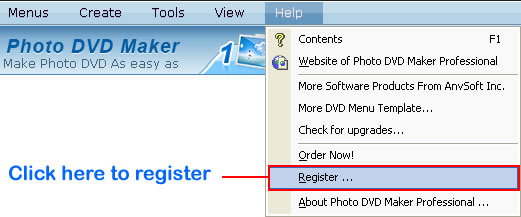
To register Photo DVD Maker, go to the menu “Help > Register”.
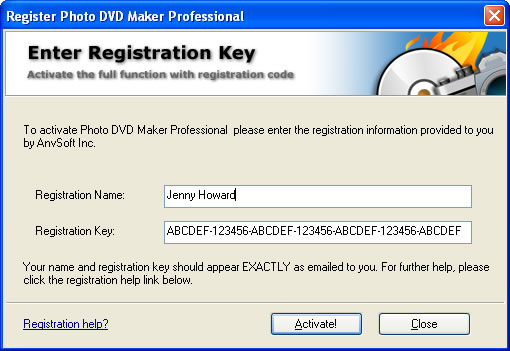
In the pop-up registration window, enter your user name and license key, and then click the Activate button to register.
3. Troubleshooting: Failed to register Photo DVD Maker
If you encounter this problem with registration, please follow the instructions below.

1. Please check if the name and code were correctly entered into the registration dialogue box.
2. DO NOT capitalize or lowercase the letters contained in the user name, just keep the user name as it's provided. It's suggested that you copy and paste the name and code into the form.
3. If the problem remains, please contact us for a new license.
4. Buy Photo DVD Maker license
Don’t have a license for the photo slideshow software yet? You can order a license for Photo DVD Maker from our website.

A copy of license will be sent to you email address soon after the order is successfully transacted. Please do provide a valid and correct email address in the order form so that you can receive your license code.
If Photo DVD Maker cannot recognize your CD/DVD burner, or there’s burning error while burning DVD/CD disc, please try the following steps:
1. Do not save a copy of source photos or addtional files on CD or DVD disc.
Click the tab “Burn Disc”, go to the “DVD/CD Recorder Options” section, and then de-select the "Save original image file on disc" option and "Save additional files on the disc" option.
2. Make sure there is enough hard disc space to store temporary files of the slideshow project.
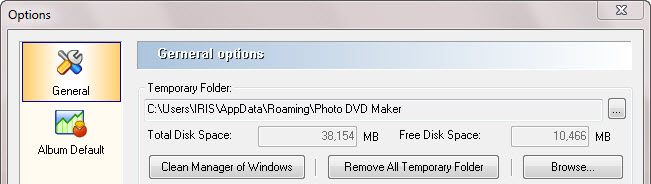
Click the menu “View > Options”, in the General you will see the status of the temporary folder. If the free disk space is not enough to store the photo slideshow project, please click the “Remove All Temporary Folder”.
3: Try different burning recorders
Please click the tab “Burn Disc” and “DVD/CD Recorder”, then choose different DVD/CD Recorder.
4. Create image file and use other software to burn your slideshow.
You can create image files by following steps:
--Choose "DVD" as the output format in "Burn Disc" window.
--Check "Create image files" option or choose "Image Recorder" in the recorder options.
--Remember to uncheck Burn to DVD+R/RW, DVD-R/RW, CD-R/RW Disc option.
--Select a folder to save your image file and then click "Burn Now" button to create image file.
Your image file will be saved in .iso format and after burning, please use other burning software such as Nero and Roxio to burn this .iso image file on disc. You can also download a free burning software called ImgBurn to burn your slideshow to CD/DVD. The steps are:
--Run the program and choose Mode>Write menu
--Click the Browse button in Source panel to choose the .ISO image file you have made.
--Select the burner you have in Destination panel.
--Click the DVD icon to start burning.
If the problem persists, we suggest you to use our Photo DVD Maker 8.10 version.